
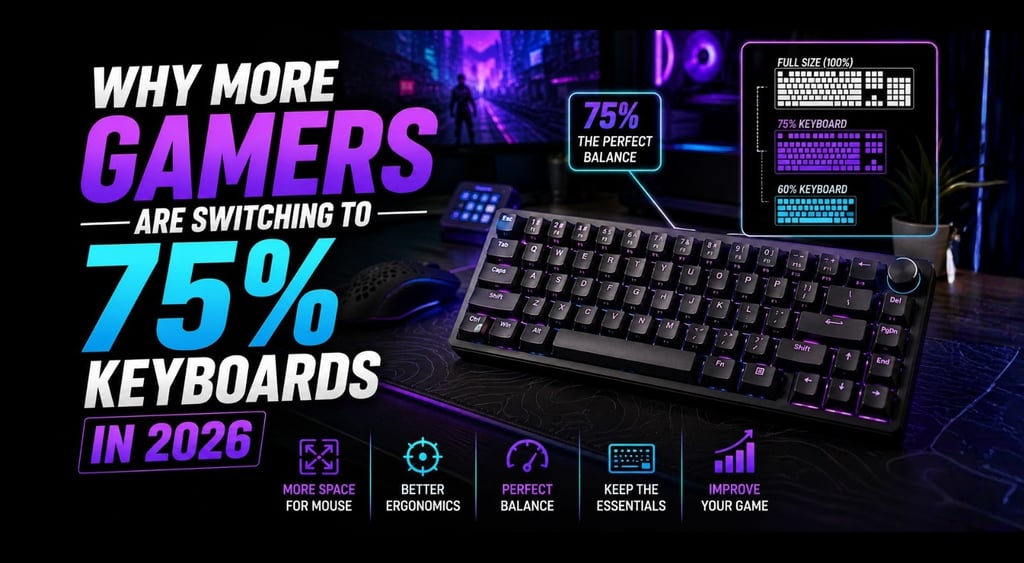
Why More Gamers Are Switching to 75% Keyboards in 2026
75% keyboards are becoming one of the smartest choices for gamers who want more desk space without losing essential keys.
HARDWARE TIPS
Guilherme .A - MundialGame
5/6/20264 min read
Why More Gamers Are Switching to 75% Keyboards in 2026
For years, full-size keyboards were the default choice for gaming setups.
They looked complete, had every key available, and were easy to find in almost every price range.
But in 2026, more gamers are moving away from full-size keyboards and choosing something more compact: the 75% keyboard.
And this trend is not just about aesthetics.
A 75% keyboard can make your setup cleaner, give your mouse more space, and still keep the keys most players actually use every day.
For small desks, FPS games, budget setups, and minimalist rooms, this layout makes a lot of sense.
What Is a 75% Keyboard?
A 75% keyboard is a compact keyboard layout that removes the number pad and reduces unused spacing, while still keeping many important keys.
Unlike a 60% keyboard, a 75% keyboard usually keeps:
The function row
Arrow keys
Navigation keys
A compact but practical layout
That makes it smaller than a full-size keyboard, but still easier to use for everyday tasks.
This is why many players see it as the “safe compact choice.”
You get more desk space without feeling like you sacrificed too much functionality.
Why Full-Size Keyboards Feel Too Big Now
A full-size keyboard can still be useful, especially for work, spreadsheets, or productivity.
But for gaming, it often creates one big problem:
it takes up too much horizontal space.
That matters more than many beginners realize.
If your keyboard is too large, your mouse area becomes smaller. This can affect:
Aim comfort
Arm movement
Mousepad space
Desk organization
Long gaming sessions
This is especially noticeable in FPS games, where lower sensitivity players need more room to move the mouse.
A smaller keyboard does not magically make you better, but it can make your setup feel less restricted.
And that comfort can absolutely improve consistency.
Why 75% Is the Sweet Spot for Many Gamers
The problem with 60% keyboards is that they can feel too limited for some users.
They look clean, but losing arrow keys and function keys can become annoying if you use your PC for more than gaming.
On the other side, full-size keyboards are practical but bulky.
That is where 75% keyboards fit perfectly.
They are compact enough for gaming, but still practical enough for daily use.
A 75% keyboard is especially good if you:
Play games often
Have limited desk space
Still use function keys
Want arrow keys
Prefer a cleaner setup
Do not need a number pad
For most gamers, this layout feels like a smart compromise.
Better Mouse Space Can Actually Change Your Setup
One of the biggest benefits of a 75% keyboard is mouse freedom.
When your keyboard takes less space, your mouse movement becomes more natural.
This is useful for:
Fortnite
Valorant
CS2
Apex Legends
Call of Duty
Any game where aiming matters
Many players spend money on better mice and mousepads but ignore the keyboard layout.
That is a mistake.
If your keyboard is too wide, even a good mousepad may feel cramped.
A compact keyboard can make your entire setup feel more balanced.
75% vs TKL vs 60%: Which One Makes More Sense?
A lot of players get confused between compact keyboard sizes.
Here is the simple version.
75% Keyboard
Best for players who want compact size but still need function keys and arrows.
It is practical, clean, and balanced.
TKL Keyboard
A TKL keyboard removes the number pad but keeps more spacing than a 75% layout.
It is a good option, but usually not as compact.
60% Keyboard
A 60% keyboard is very small and great for maximum mouse space.
But it removes several keys that some people still use daily.
For most gamers, 75% is easier to live with than 60%.
What to Look for in a 75% Gaming Keyboard
Not every compact keyboard is good.
Before buying one, pay attention to these points.
Switch Type
For gaming, linear switches are usually the safest choice because they feel smooth and fast.
Common switch types:
Red switches: smooth and usually quieter
Brown switches: tactile but not too loud
Blue switches: clicky and loud
If you share a room or play at night, avoid loud blue switches unless you really like the sound.
Build Quality
A compact keyboard should still feel stable.
Avoid keyboards that feel hollow, flexible, or too lightweight in a bad way.
A solid keyboard improves both typing and gaming comfort.
Connectivity
Some 75% keyboards offer:
Wired mode
Bluetooth
2.4GHz wireless
For gaming, wired or 2.4GHz wireless is usually better than Bluetooth because latency tends to be more stable.
Keycap Quality
Cheap keycaps can feel thin and wear out quickly.
If possible, look for PBT keycaps or at least a keyboard with decent keycap quality.
Popular 75% Keyboards Gamers Often Consider
Some popular 75% options include:
Keychron K2
Royal Kludge RK84
EPOMAKER TH80
EPOMAKER TH80 V2 Pro
The Keychron K2 is known as a compact 75% wireless mechanical keyboard with support for multiple operating systems, while EPOMAKER’s TH80 line focuses on compact layouts, wireless options, and gaming-friendly features like anti-ghosting and low-latency modes depending on the model.
The best choice depends on your budget and setup.
If you want something simple and reliable, Keychron is often a safe direction.
If you want more gaming-focused features, EPOMAKER and Royal Kludge may be worth checking.
Who Should Buy a 75% Keyboard?
A 75% keyboard makes sense if you want a smaller setup without going too extreme.
It is a strong choice for:
FPS players
Small desk setups
Students
Bedroom gaming setups
Budget gamers
Players who still need function keys
It is also great if you want your setup to look cleaner without losing too much usability.
Who Should Avoid a 75% Keyboard?
You may want to skip 75% keyboards if you use the number pad every day.
For example, if you work with:
Accounting
Spreadsheets
Data entry
Heavy productivity tasks
A full-size keyboard may still be better.
Also, some 75% layouts feel slightly cramped because the keys are closer together.
If you prefer more spacing, a TKL keyboard may feel more comfortable.
Final Verdict: Are 75% Keyboards Worth It?
Yes — for many gamers, a 75% keyboard is one of the best layout choices in 2026.
It gives you more mouse space, keeps your setup cleaner, and still preserves the keys most people actually use.
It is not just a trend.
It solves a real problem.
If your desk feels crowded or your mouse movement feels limited, switching to a 75% keyboard might be one of the simplest upgrades you can make.
FAQ
Is a 75% keyboard good for gaming?
Yes. A 75% keyboard is great for gaming because it saves desk space while keeping important keys like arrows and function keys.
Is 75% better than 60% for gaming?
For many players, yes. A 60% keyboard gives more space, but a 75% keyboard is easier to use daily because it keeps more keys.
Do 75% keyboards have arrow keys?
Most 75% keyboards include arrow keys, which is one of the biggest reasons gamers prefer them over 60% keyboards.
Are 75% keyboards good for small desks?
Yes. They are one of the best choices for small desks because they reduce keyboard width and create more mouse room.
Sources
MUNDIALGAME
Practical gaming guides, honest reviews, and budget-friendly advice for PC, PS5, Xbox, Nintendo Switch, and Steam Deck player
Contact
Newsletter
contact@mundialgame.com
© 2026. All rights reserved.